What's new
Edit a role's tiers step by step, with a check before saving
· For admins
A role's behaviour tiers now open one step at a time, from baseline to role model. Statements that blur two tiers get a note as they are typed, and saving first checks the edit against your key skills.
Why tiers have to stay apart
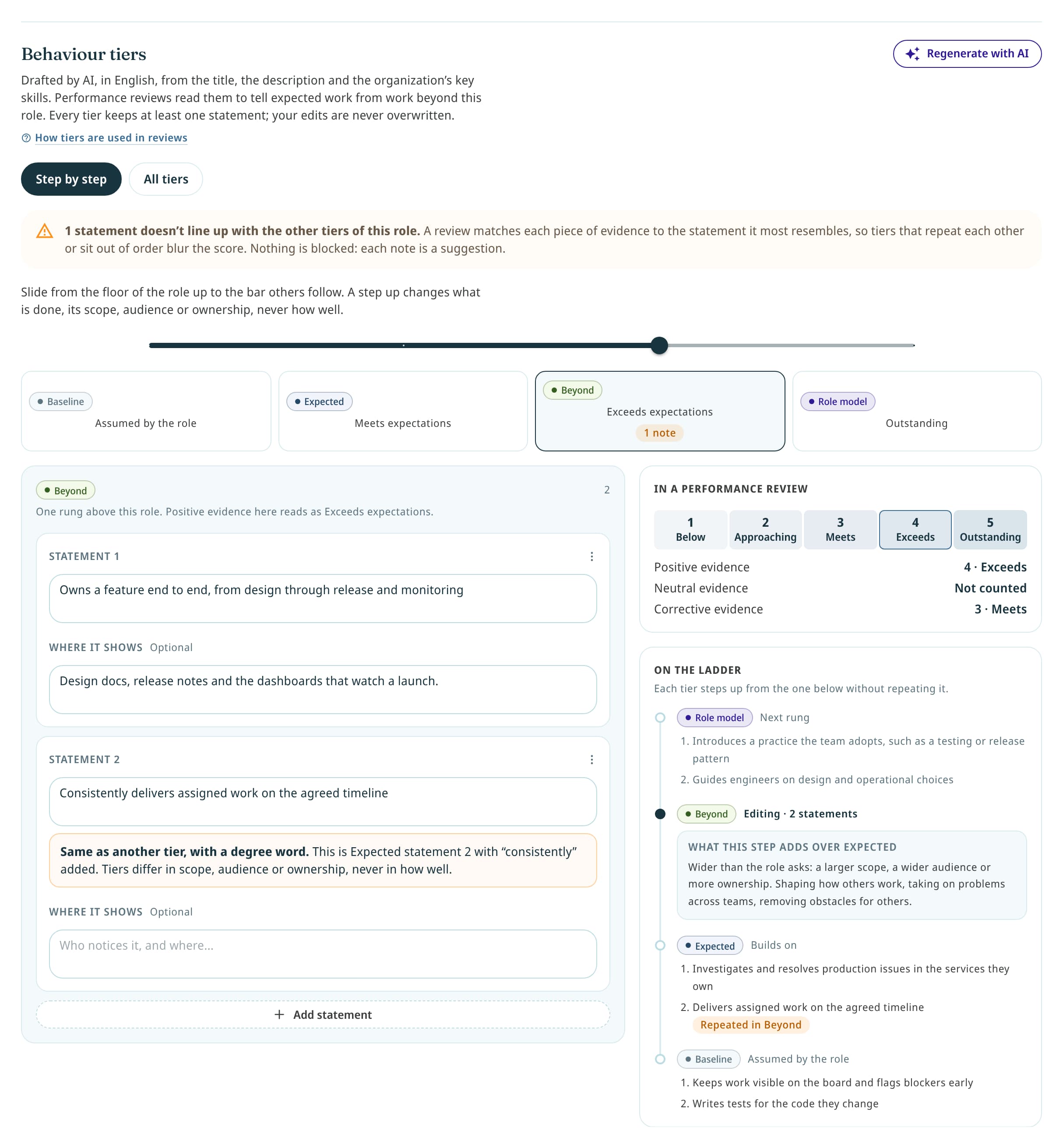
A performance review matches each piece of evidence to the tier statement it most resembles, and the tier decides how the evidence reads: praise for expected work meets expectations, praise for work beyond the role exceeds them. That only holds while the tiers say different things.
Take a Backend Engineer whose Expected tier says "Delivers assigned work on the agreed timeline". If an edit makes Beyond say "Consistently delivers assigned work on the agreed timeline", praise for delivering on time can match either statement, and two people doing the same work can be read at different levels.
One step at a time
A role's tiers now open step by step: one tier at a time on a slider, from the floor of the role up to the bar others follow. Each step shows what it adds over the one below and the tiers it builds on and, where reviews carry an AI-calculated rating, how evidence matched to it reads in a review. A step up changes what is done, its scope, audience or ownership, never how well. The four tiers side by side are still one click away.
Notes as you write
While an admin edits, a statement that doesn't line up with the rest of the role gets a note under it:
- Repeats another tier. The same wording sits in two tiers, so the same work can read at either level. The note offers to remove the repeat.
- Same as another tier, with a degree word. Words such as consistently, proactively or highly say how well, not what. The note names the statement it copies.
The slider counts the notes on each tier, and the ladder marks the statement that is repeated. Nothing is blocked: each note is a suggestion.
A check before saving
Save no longer saves at once. It first checks the whole edit, and when the edit would change how reviews read, a dialog reports what it found in two steps:
- Between tiers. Statements that repeat or read like another tier. AI reads the statements that were reworded, added or moved, and says which tier each one reads like.
- Key skills. The organization's key skills the edit would put out of line. In the example, the reworded statement was the only one above Baseline that touched Craftsmanship. Praise for Baseline work reads as meeting expectations at most, so Craftsmanship could no longer lift a score in this role.
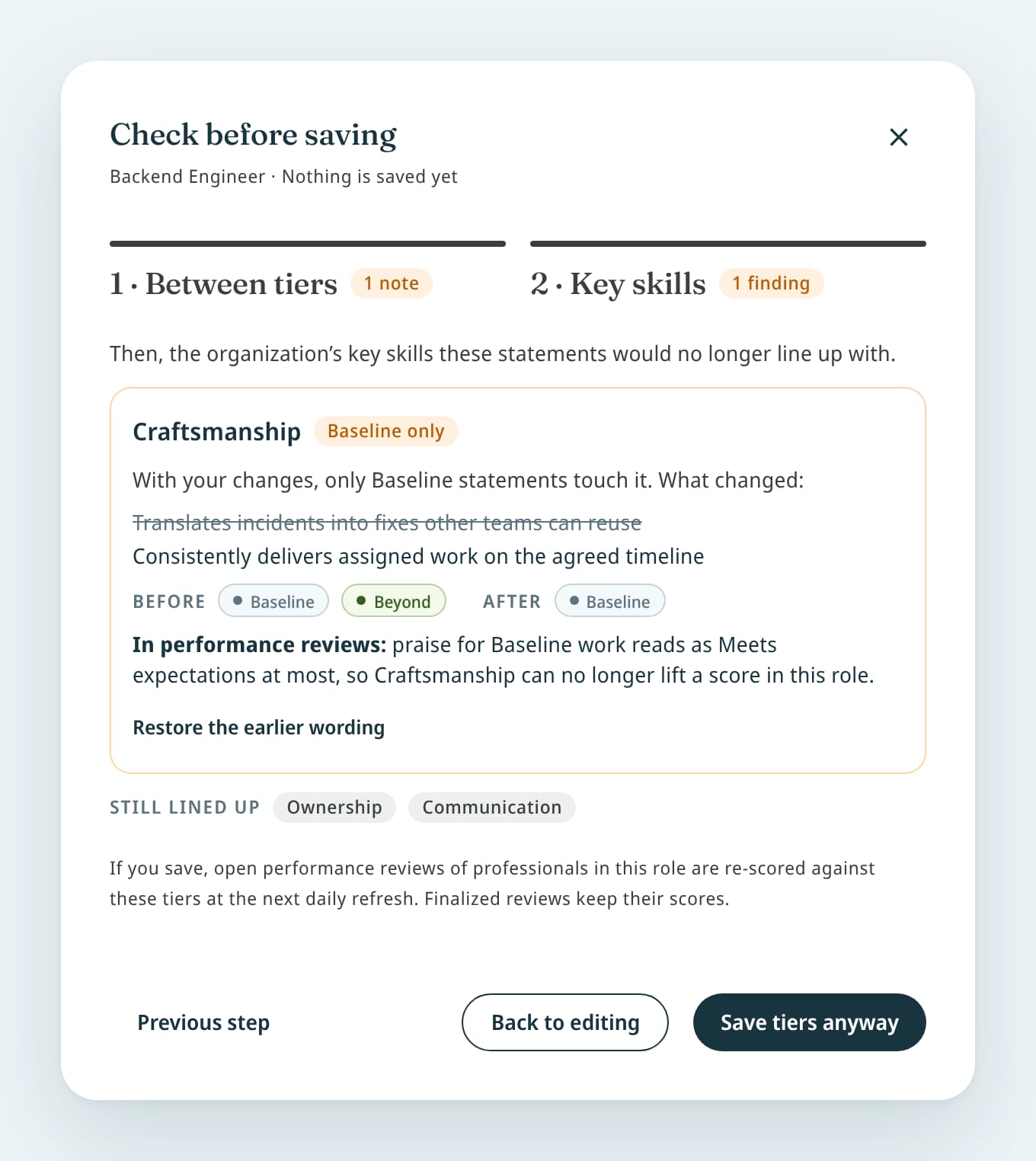
Each finding says what it would do in performance reviews and offers to undo the change behind it. The admin can go back to editing or save anyway: the check never blocks a save. Saved tiers reach open reviews at the next daily refresh, and finalized reviews keep their scores.
And a few more
- Moderators who edit job roles get the same view and the same check.
- How tiers are used in reviews, a panel on the Job roles page, now explains the tiers from the organization's own evaluation setup.
- If the check can't be completed, it never holds a save back: the notes found while editing are still shown, and the admin can save.